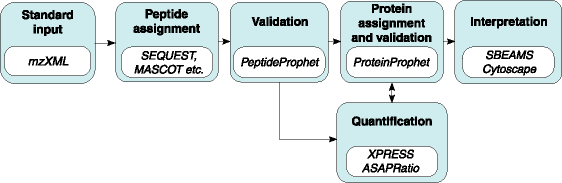
To navigate you can click on the image map below!
The goal of the Seattle Proteome Center (SPC) is to evolve as a local, highly interactive, multi-disciplinary group, bringing together scientific expertise from diverse areas such as biology, chemistry, proteomics, physics, bioinformatics, and statistics, to enhance and develop innovative proteomic technologies and apply them to biological questions relevant to heart, lung, blood, and sleep.
The proteomic software developed at the center provide researchers with an array of tools that help standardize, analyze, quantitate, and retain results for future access of highly complex mass- spectrometry data. This software is open-source to encourage its use and development in the wider proteomic research community.
To aid researchers in climbing the learning curve of these tools, the SPC provides a week-long course on using and applying these tools. You can review the material of the October 2006 course in these pages. If you are interested in registering for the next course, please contact the Center with your name and contact information. You will be notified when the next application process begins.